Open a folder. Open a STEP. Talk.
A CAD workbench on your Mac. It works with the AI subscriptions you already have. Quest Browser on the same Wi-Fi.
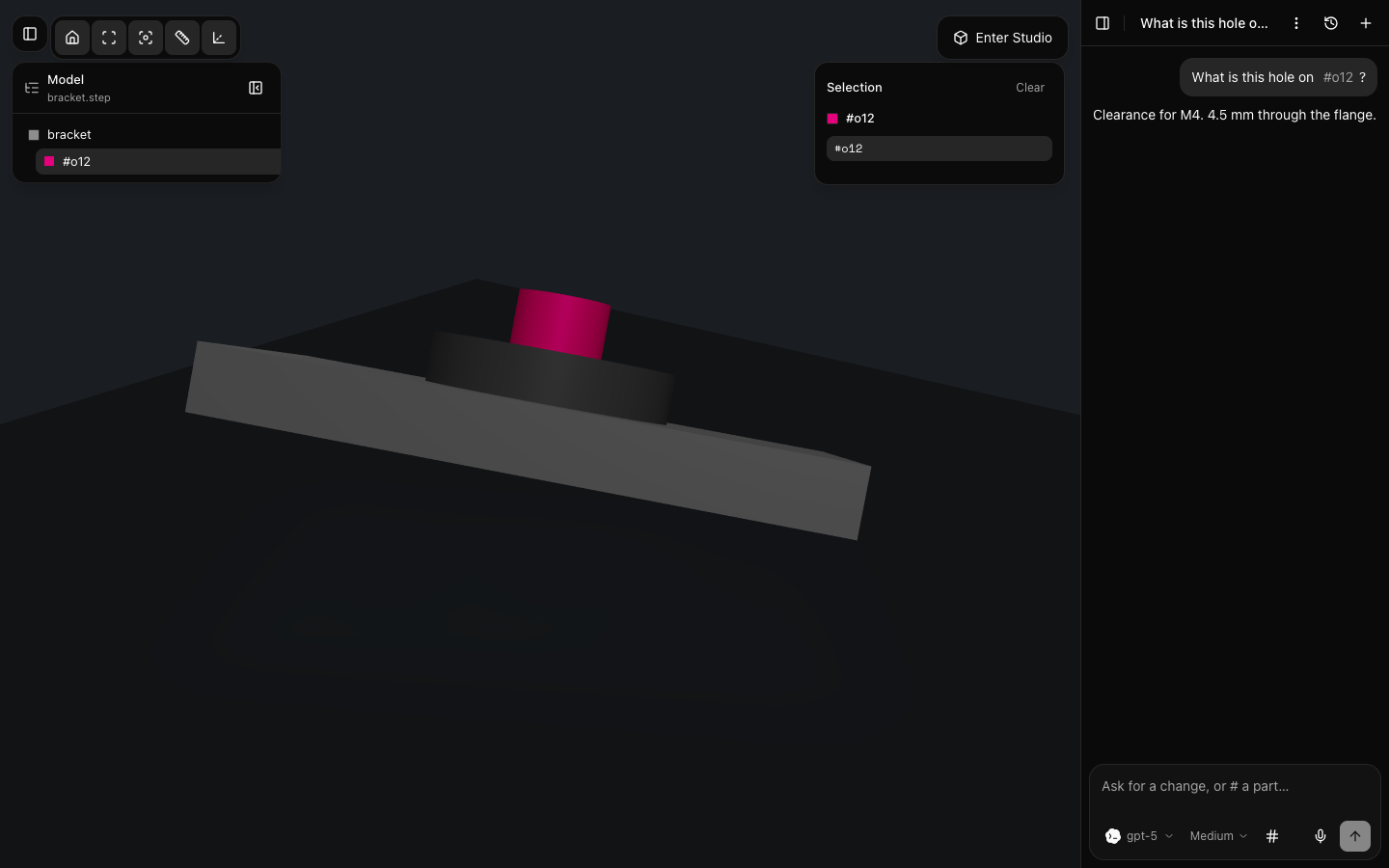
Folder
A directory on the Mac is the project and the agent cwd.
STEP or GLB
OpenCascade in the local server. No Python, no second tessellator.
Quest
Same Wi-Fi, Quest Browser, pair once. Enter Studio on the headset.
Works with your AI subscriptions.
Claude Code, Codex, Grok, or OpenCode: the logins already on your Mac. This app does not take API keys. Cursor is in the picker; a Mac login is not visible here yet.
 Claude Code
 Codex
Codex
 Grok
Grok
 OpenCode
On the headset
Same process. Quest Browser.
Pair once on the same Wi-Fi. Enter Studio in the headset. Drop a capture in when you have one.
Unzip. Open Anyway. Pair the headset.
Mac
Unzip sfab-bench-*-arm64.app.zip from Releases, drag it to Applications, double-click, then System Settings → Privacy & Security → Open Anyway. Ad-hoc signed, not notarised yet. Or clone and pnpm desktop.
Quest
Quest Browser on the same network as the Mac, pair once. Not an APK. The Mac tab stays on loopback.